A new build of Windows 10, 10056, has leaked and all interested users can try that new Recycle bin icon and mentioned UI changes in action.
Author: Sergey Tkachenko
Windows 10 allows setting different colors for windows and taskbar
I just discovered a secret hidden tweak in Windows 10 which allows you to set a different color for window frames and the taskbar. By doing a simple Registry edit, you will be able to set a different color for the taskbar and for window frames. Here we go.
Windows 10 has disable Start menu transparency feature and a darker theme in recent builds
Images of private Windows 10 builds continue to leak to the Internet. The latest leaks indicate a darker appearance of Metro UI along with an updated Settings app.
A new Recycle Bin icon is spotted in the latest Windows 10 builds
Lately, newer Windows 10 builds have included a new Recycle Bin icon that replaces the old well-known icon from Windows Vista.
The old one looked like this:

Microsoft changed that icon to this:
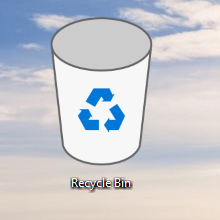
However, there was much furor and controversy over it. Lots of people started to complain about the new Recycle Bin icon (although I don't see what the big deal is since it is customizable). Microsoft got mostly negative feedback about Windows 10 icons and so they finally decided to replace at least the Recycle Bin icon.
AeroRainbow
AeroRainbow is the software that can change the color of Aero windows depending on your desktop background's color, or by a predefined list of colors. It can also randomize the colors. Initially, it was designed for Windows 7 to add a more personalized touch to your desktop. Since version 2.7 you can use AeroRainbow in Windows 8. Starting with version 4.0, AeroRainbow supports Windows 10.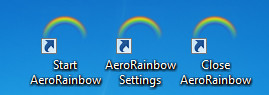
AeroRainbow 4.1 is available. Please upgrade your app.
How to add Recent items to left pane of File Explorer in Windows 10
Windows 10 does not come with the Recent places option in the navigation pane of File Explorer like Windows 8 or Windows 7. Instead, it has the "Recent files" group inside the Quick Access folder. This is not at all convenient for users who were used to accessing Recent places with one click from the navigation pane. Today we will see how to add Recent items to left pane of File Explorer in Windows 10.
The full list of Firefox about: commands
In our articles, we often mention the about:config command which can be entered in the address bar. That command opens the built-in configuration editor of the Firefox browser and allows performing extreme fine-tuning of the browser. It contains lots of options which are not accessible from the browser's settings interface. Many Firefox users are not even aware that about:config is not the only about: command available in the browser. Firefox comes with a huge set of useful about commands which I would like to share with you today.
Change network location type (Public or Private) in Windows 8.1 and Windows 8
With Windows 8, Microsoft changed the way you define a network type. Earlier, in Windows 7 and Vista, the operating system allowed the user to set the connected network as public or private quickly with one click. However, in Windows 8 and above, the way you are supposed to set your network connection to Public or Private is completely different and very confusing. I would like to share how you can change the network location type in Windows 8.1 and Windows 8.
Winaero Tweaker 0.2.2 released
Winaero Tweaker, my primary software project here at Winaero which consolidates all my tools has reached version 0.2.2. Unfortunately, last week I was not able to release a new version, but it is released now. Here is a brief description of the changes you will get in version 0.2.2.
Disable administrative shares in Windows 10, Windows 8 and Windows 7
By default, Windows creates some hidden shared folders. These folders are identified by a dollar sign ($) at the end of the share name and so they are hidden. Hidden shares are those that not listed when you look at the network shares on a computer in File Explorer's Network node, or using the net view command. Windows 10, Windows 8, Windows 7 and even Vista and XP create hidden administrative shares that administrators, programs, and services can use to manage the computer environment on the network. In this article, I would like to share with you two ways to disable these shares.

