Microsoft has released the public preview of the Windows App Development CLI, known as winapp, an open-source command-line tool designed to simplify the development lifecycle for Windows applications. The tool supports a broad range of frameworks and toolchains, including Electron, C++ with CMake, .NET, Rust, and Dart.
Advertisеment
Wha't winapp offers
The winapp CLI targets developers who work outside Visual Studio or MSBuild. It provides direct access to modern Windows APIs, such as Windows AI APIs, security features, and shell integrations, regardless of the underlying toolchain.
By consolidating complex tasks like SDK management, manifest editing, certificate generation, and packaging into a single interface, the CLI reduces configuration overhead.
One-line Environment Setup
Developers can initialize a complete Windows development workspace using the winapp init command.
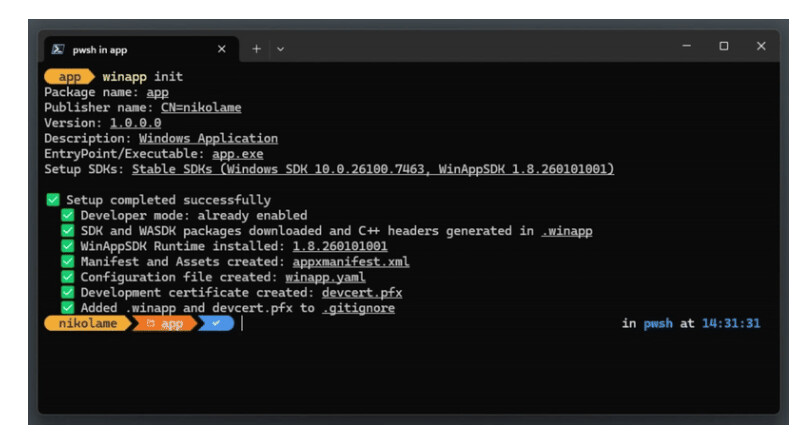
This action downloads required SDKs, generates C++/WinRT projections, creates manifests and assets, and configures certificates. For shared projects, the winapp restore command ensures consistent environments across machines. Integration with GitHub and Azure DevOps further supports CI/CD workflows.
Automated Package Identity for Debugging
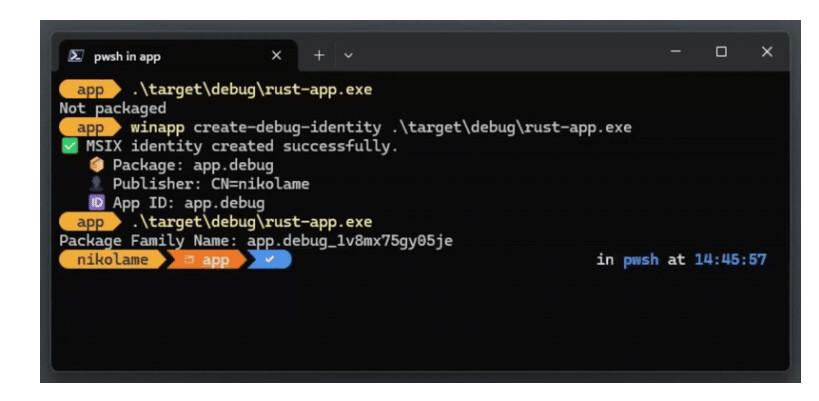
Modern Windows APIs often require Package Identity. Traditionally, this necessitated full app packaging for testing. The CLI introduces winapp create-debug-identity, which adds identity directly to an executable, preserving rapid debugging cycles without full installation.
Automated Manifest and Certificate Management
The CLI automates creation and maintenance of appxmanifest.xml files and development certificates. Commands like winapp manifest update-assets refresh all image assets from a single source file, while winapp cert generate creates and installs a self-signed certificate for local testing.
Simplified MSIX Packaging
Packaging applications as MSIX requires only one command: winapp pack. The tool handles both bundling and signing, producing store-ready or sideload-ready packages from build output directories.
Advanced Support for Electron Developers
Electron developers benefit from an npm-distributed version of the CLI. It scaffolds native C++ or C# addons pre-configured for Windows SDKs and enables direct integration of high-performance features, including AI capabilities like Phi Silica. The command winapp node add-electron-debug-identity injects Package Identity into running Electron processes, enabling immediate API testing during development.
Additionally, Microsoft offers experimental Node.js projections for Windows APIs, such as LanguageModel, through the @microsoft/winapp-windows-ai npm package.
How to try the winapp CLI
The winapp CLI is now available in public preview. Developers can install it via WinGet for general use or via npm for Electron projects. Documentation, sample guides for .NET, C++/CMake, Rust, and Electron, and issue reporting are accessible through the project’s GitHub repository.
Support us
Winaero greatly relies on your support. You can help the site keep bringing you interesting and useful content and software by using these options:

