Microsoft has released an update extending Cross Device Resume functionality for Windows 11 users. This feature, first introduced in the May 2025 Windows non-security update (KB5058499), enables continuity between Android devices and Windows PCs.
Expanded application support
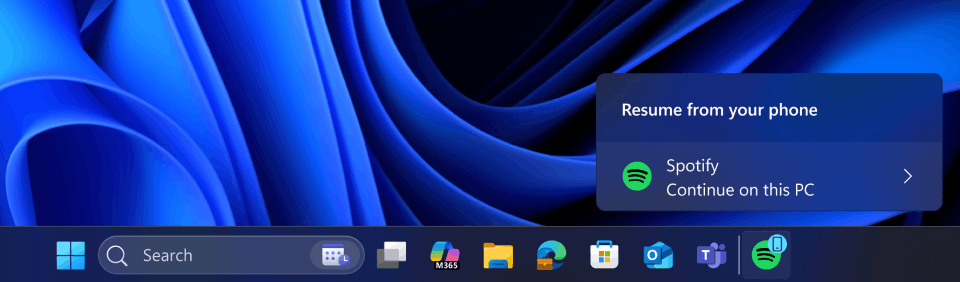
Builds 26100.7701 and 26200.7701 (KB5074105), released to Windows 11 Insiders using the OS in the Release Preview channel, broadens activity resumption across commonly used applications. Users may continue Spotify playback sessions, resume work in Microsoft Word, Excel, or PowerPoint documents, and extend web browsing sessions from their Android phone to their Windows PC. The system recognizes active applications and services to facilitate seamless transitions between devices.
Improved device compatibility
Vivo smartphone users gain the ability to continue browsing sessions initiated in Vivo Browser directly on their Windows PC. Additionally, Android device owners using phones from HONOR, OPPO, Samsung, Vivo, or Xiaomi may resume online files opened within the Microsoft Copilot application on their mobile device.
These files open in the corresponding Microsoft 365 desktop application when installed, or in the default web browser if the native application is unavailable. The feature supports only cloud-stored files and does not extend to content saved exclusively offline on the mobile device.
Implementation requirements
Cross Device Resume operates through integrated system services without requiring additional software installation on supported Windows 11 devices. Users must maintain active connections between their Android device and Windows PC through Microsoft companion applications and Phone Link, and enable account synchronization to get the things work together.
Support us
Winaero greatly relies on your support. You can help the site keep bringing you interesting and useful content and software by using these options:

