A previously unknown Easter egg has surfaced in Microsoft Office 97, nearly three decades after the software’s initial release. It reveals a hidden set of developer credits within Microsoft Word.
Advertisеment
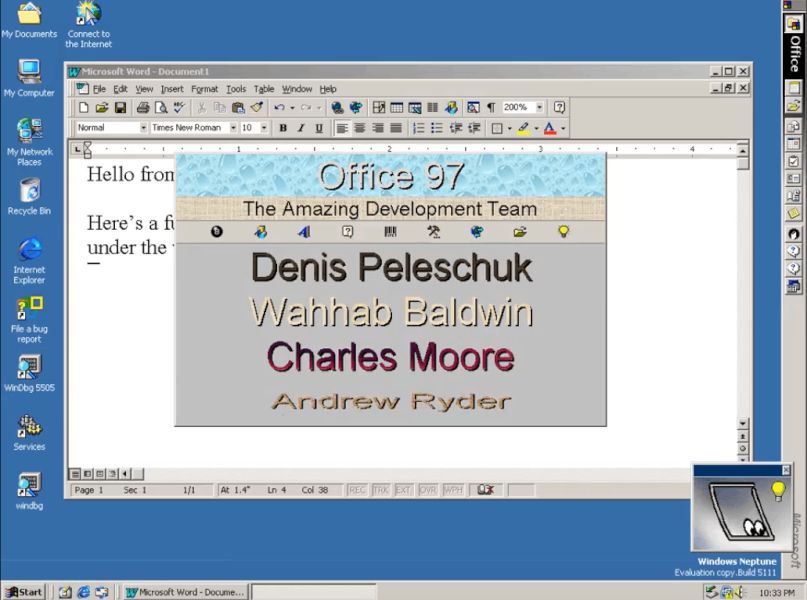
The discovery comes from X user Albacore (@thebookisclosed), who documented the intricate steps required to trigger the Easter egg.
Reading @stevesi's amazing posts about Office 97's development got me wondering.. could there be more fun stuff hiding under the hood that nobody found yet? Yessir! There's a whole developer credits sequence incl. commentary from Clippit that starts 1 minute in. Take a look! 📹📎 pic.twitter.com/h83VnGfk4E
— Albacore ☁️ (@thebookisclosed) January 11, 2026
Initial steps
- First of all, users must first ensure their system date is set to 1997 or later.
- They then hold the Control key while selecting the standard toolbar.
- Next, they move the toolbar left, down, right, and up, releasing and re-pressing the Control key before each directional movement.
Final Step Involves Clippy Interaction
After completing the toolbar sequence, users must open the Clippy assistant and search for the exact phrase “This is not a contest.” including the period. This action displays the hidden credits. Additional animations appear if the user holds the Shift key while pressing Search.
A Secret Meant for Few
Albacore noted the complexity of the activation process, stating, “With such a convoluted activation sequence I'm not surprised that there are no obvious traces of the Easter egg even now, 29 years later. The comments Clippy provides are a cherry on top.” The elaborate combination of toolbar manipulation and a specific query to Clippy suggests the feature was not designed for casual discovery.
Well, this find joins other well-documented Easter eggs from the same era, including the Word 97 Pinball game and the Excel 97 Flight Simulator. These hidden features remind us about a now-dead tradition among Microsoft developers of embedding playful acknowledgments into their work, often with deliberately obscure access methods. Sadly, modern policies at Microsoft do not permit such things.
Support us
Winaero greatly relies on your support. You can help the site keep bringing you interesting and useful content and software by using these options:

