Theme of the day:

Forest theme for Windows 8

Take your attention: White Windows for Windows 8 software was incapsulated by Aero8Tuner and not exists anymore!
Latest version of Aero8Tuner is 1.1. Please update.
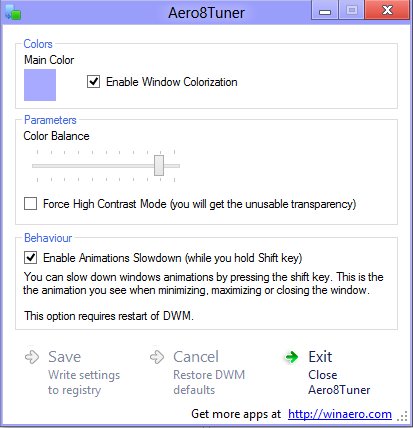
Here is my brand new work for Windows 8. Aero8Tuner is the successor of my famous Aero Tuner (for Windows 7) and White Windows (for Windows 8 ). It allows you to change all settings of DWM/Aero at Windows 8 RTM+.

Warning! This version is for Windows 8 RTM and above! For Windows 7 and Windows 8 CP/DP/RP you may use previous Aero Tuner software.

With Aero8Tuner you will able:
  • to set any color of windows.
  • to disable windows coloring. If you will enable this undocumented feature, the color of windows borders in Windows 8 will be always white. The taskbar will use Aero color. So, this is way to have separate color for windows and taskbar.
  • to change color balance (affects the intensity).
  • to force High Contrast mode for regular themes. The blurless buggy Aero transparency will be appeared in this case.


Aero8Tuner in action


Animations slowdown video


Why some features of "classic" Aero Tuner is missing in this version?


Microsoft changed DWM in Windows 8. Some parameters was completely removed, such as Transparency and amount of Aero Srtipes. Some parameters like second Aero color, Blur, balance between colors has no effect in Windows 8 because DWM ignores their values.


This is a free and portable application and does not require to be installed. It works only on Windows 8 RTM and does not require any additional software.

Download: Aero8Tuner

Donate options for satisfied users:

Comments
RaymonVisual|08 Aug
Guest


Great work! :D

Rhor|09 Aug
Guest


Nicely done, it looks elegant, but some people will have an issue because of eyesight problems. Some peeps need darker or neutral tones like grey to look at a screen comfortably for hours, maybe a tweak to this software to let it do that?

Thank you.

Sergey |09 Aug
Comments: 369


I looking the way, but still not find it

Anonymous|09 Aug
Guest


Dud you are a lifesaver! I was so pissed off when Microsoft killed this feature in RTM. I can't thank you enough

Sergey |09 Aug
Comments: 369


Stay tuned, I will provide more tools for Windows 8 appearance

Marco|11 Aug
Guest


Google Chrome says your software is DANGEROUS, so I better pass. Don't publish malware.

Anonymous|11 Aug
Guest


in Windows 8 because DWN

May be DWM?

Sergey |11 Aug
Comments: 369


sure, DWM. thank you.
Marco, your Chrome is a lier. My software is 100% clean. you can always check it by yourself.

ace1|13 Aug
Guest


Aero8Tuner & Patchex7 Work Great Together Thank You

Patchex7 (Windows 7 explorer.exe for Windows
All credits to Tihiy

Anonymous|13 Aug
Guest


Aero8Tuner (All credits to Happy Bulldozer) Thank You.

Aero8Tuner & Patchex7-b3 Work Better Together.

Patchex7-b3 (All credits to Tihiy) Thank You.
Taskbar is properly colorized; Taskbar and start menu are translucent.

Anonymous|17 Aug
Guest


@Happy Bulldozer Can i share a tip for windows 8 x32 & x64 !!!

How to bypass serial input: COPY & PASTE

[EditionID]
Core
Professional

[Channel]
Retail

[VL]
2

Into New Text Document & Save as EI.CFG (NOT EI.CFG.txt).
Put the new EI.CFG file in sources on the DVD Disc & Install with no Serial.


luke|18 Aug
Guest


Hi
Can you make an option to change the black text color in the top border?
I am using a the black color for my windows border.
I have this information about the text color in the top border from PandaX

Extract the variant in the msstyles (File.msstyles\VARIANT\NORMAL) as a raw binary file. In a hex editor search for:

Code:
DB 0E 00 00 CC 00 00 00 CF 00 00 00 2F 00 00 00 01 00 00 00 00 00 00 00 00 00 00 00 04 00 00 00 28 28 28 00 00 00 00 00
replace with

Code:
DB 0E 00 00 CC 00 00 00 CF 00 00 00 2F 00 00 00 01 00 00 00 00 00 00 00 00 00 00 00 04 00 00 00 FF FF FF 00 00 00 00 00
which will turn it completely white.

If you want to use another color just change the underlined bytes. It's in order of RGBA and A is always 00.

Sergey |18 Aug
Comments: 369


Please be patient, I making a tool what will allow this.

YTDamnit|21 Aug
Guest


Is there any chance we weill get a functional transparent border back?

Sergey |21 Aug
Comments: 369


I can't tell that at this moment

velvora|28 Aug
Guest


i am currently using win 8 pro. whenever i click aero 8 tuner, then nothing happened. i installed my netbook with the same OS with my PC. but on my netbook, aero 8 tuner work very well. can you tell what wrong with my pc??

Sergey |28 Aug
Comments: 369


Somewhat wrong with .NET 4.5 on you PC. On netbook it works properly.
Aero8Tuner uses .NET 4.5 and that can be cause of your issue.

Anonymous|07 Sep
Guest


@Happy Bulldozer
This may interest you - but use at your own risk.
TRUE TRANSPARENCY ON WINDOWS 8 RTM.
PART 1.

IN Win8RTM
1.MUST Install Patchex7-b6 & Select 7
Install Unlocker 1.9.1
Install Take Ownership

IN Win8RTM
2.Goto C:\Windows\System32
Right click dwm.exe Select Unlocker & Rename dwm.exeRTM
Take Ownership Of dwmapi.dll & Rename dwmapi.dllRTM
Take Ownership Of dwmcore.dll & Rename dwmcore.dllRTM
Take Ownership Of dwmredir.dll & Rename dwmredir.dllRTM
Take Ownership Of themecpl.dll & Rename themecpl.dllRTM
Take Ownership Of themeui.dll & Rename themeui.dllRTM
Goto C:\Windows\System32\en-US
Take Ownership Of themecpl.dll.mui & Rename themecpl.dll.muiRTM

FROM Win8RP
3.Copy & Paste into C:\Windows\System32
dwm.exe
dwmapi.dll
dwmcore.dll
dwmredir.dll
themecpl.dll
themeui.dll
Goto C:\Windows\System32\en-US
Copy & Paste themecpl.dll.mui into C:\Windows\System32\en-US FROM Win8RP

Sign Out & Sign In (Screen Will Be Black) KEEP CLICKING ON SCREEN UNTIL YOU Sign In.
GOTO PART 2.


Anonymous|07 Sep
Guest


PART 2.

IN Win8RTM
5.Goto C:\Windows\System32
Take Ownership Of uDWM.dll Rename to uDWM.dllRTM
Copy & Paste uDWM.dll into C:\Windows\System32 - FROM Win8RP
Start Task Manager & End task - Desktop Windows Manager
Open Personalization (Pick a Theme) - Windows Color (Pick a Color) - Enable transparency.

NOTES: VERY IMPORTANT
MUST ALWAYS HAVE uDWM.dllRTM SET TO uDWM.dll FOR SIGN-OUT OR RESTARTING-PC OR SHUTTING-DOWN-PC (Screen Will Be Black).
MUST ALWAYS REPEAT STEP 5 ON STARTUP.

IF TASKBAR IS BLACK OPEN regedit & USE THESE SETTINGS.

HKEY_CURRENT_USER\Software\Microsoft\Windows\DWM
"ColorizationGlassReflectionIntensity"=dword:00000000
Start Task Manager & End task - Desktop Windows Manager

OR PLAY WITH THEMES & WINDOWS COLOR UNTIL RIGHT.

Anonymous|27 Sep
Guest


thanks for the program, but why when i log out, log in again then i have to re-do the thing again to change the color ??

Sergey |27 Sep
Comments: 369


You need not do that things.
It works on the fly for me
I an wondered if it does not apply all settings on the fly for you

Anonymous|29 Sep
Guest


it apply the sittings immediately yes, but even if i save the theme, when i re-start ... the original color comes back again , so is there is a way to save it or it is just for a temp change for the moment only ??

Sergey |29 Sep
Comments: 369


Try to disable autocolorization in 'Color and Appearance' settings
I guess it causes the issues

Kenzo|20 Oct
Guest


Very glitch when I move the window with transparency enabled

Sergey |21 Oct
Comments: 369


Thanks to the Microsoft for broken DWM

aj|28 Oct
Guest


Are you working on an update?

Sergey |28 Oct
Comments: 369


nope

Anonymous|23 Nov
Guest


thought it was a great idea to try this on the release version of Windows 8; it wasn't.
no idea what happened but this messed up my DWM, right click and left click won't work, charms and start menu doesn't work going to have to try booting in to safe mode and backing up my files and reinstall Windows 8

Dean|09 Dec
Guest


Thanks so much for this incredible app. It would be great to have the option to set any colour to the window border and any colour to the taskbar. Are you planning to update the app to allow this?

Sergey |10 Dec
Comments: 369


I if figure the way - i will implement it

Anonymous|19 Jan
Guest


Can you round up ALL window corners please!!
Hate hard square corners..

Azumig|20 Apr
Guest


Esta Muy Bacano

boltozavr|24 Apr
Guest


Thank you for your trouble! But there is a flaw in the program that just angry. When smotrish tours in Tallinn online movies or games are started windows close themselves.

Submit comment
Username:
Comment: