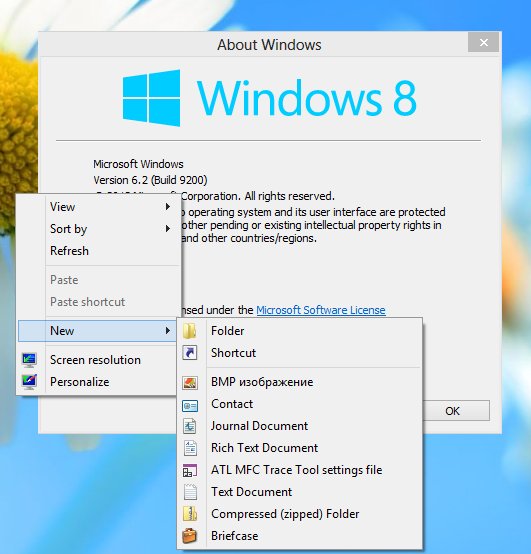
Although Windows 8 offers you several "modern" data synchronization solutions such as SkyDrive and Microsoft Account, they both are limited - they are dependent on the Internet. You may or may not know about the old "Briefcase" feature which was removed from Windows 8. It offers you simple two way data synchronization which was offline and could be used with removable drives. Someone at Microsoft decided to remove it from the brand new release of Windows 'cause he thought perhaps that the feature was too outdated. If you miss Briefcase, here is a simple solution for you.
I have figured out a way to restore the Briefcase feature with a simple registry hack. It looks as follows:
Windows Registry Editor Version 5.00

[HKEY_LOCAL_MACHINE\SOFTWARE\Classes\Briefcase\ShellNew]
"IconPath"=hex(2):25,00,53,00,79,00,73,00,74,00,65,00,6d,00,52,00,6f,00,6f,00,\
  74,00,25,00,5c,00,73,00,79,00,73,00,74,00,65,00,6d,00,33,00,32,00,5c,00,73,\
  00,79,00,6e,00,63,00,75,00,69,00,2e,00,64,00,6c,00,6c,00,2c,00,30,00,00,00
"ItemName"=hex(2):40,00,25,00,53,00,79,00,73,00,74,00,65,00,6d,00,52,00,6f,00,\
  6f,00,74,00,25,00,5c,00,73,00,79,00,73,00,74,00,65,00,6d,00,33,00,32,00,5c,\
  00,73,00,68,00,65,00,6c,00,6c,00,33,00,32,00,2e,00,64,00,6c,00,6c,00,2c,00,\
  2d,00,36,00,34,00,39,00,33,00,00,00
"Directory"=""
"Handler"="{85BBD920-42A0-1069-A2E4-08002B30309D}"

[HKEY_LOCAL_MACHINE\SOFTWARE\Classes\Briefcase\ShellNew\Config]
"IsFolder"=""
"NoExtension"=""
As you can see, there is no magic here. The main value is the missing "ShellNew" subkey at Briefcase's file descriptor branch in the registry. All you need is to merge the following registry tweak:
Merge the Windows 8-Enable Briefcase.reg file to enable Briefcase feature. Merge the Windows 8-Disable Briefcase.reg file to disable it again. Quite simple.
If you have trouble synchronizing files in the Briefcase after you have restored it, please see this article.
Support us
Winaero greatly relies on your support. You can help the site keep bringing you interesting and useful content and software by using these options:


Briefcase restore tweak worked … thanks!
Great ! it worked flawlessley. it was required …. thanks a lot
What do you mean MERGE the file?
I downloaded the file and opened the registry. Now what do I do ?
Please refer to the following article: https://winaero.com/blog/windows-registry-editor-for-dummies/
That means you’re done! Opening the file means merging it.
Seconded. works flawlessly. A big thank you.
The tweak worked to install the Briefcase but then I can’t synchronize it!!!
Any idea?
Thanks
Which locations are you synchronizing? Right click on Briefcase, it has “Update All” command.
Thanks to Sergey for posting thgis tweak.
I agree it’s not as obvious as having a “Briefcase” button on the menu. So try selecting the files & folders you want to synchronize then right-click and chhose “Update”.
Does anyone know how to add Briefcase to the menu – with Update All, Update Selection and Split from Original commands?
Cheers
@Roy Eastwood, use Winaero’s Ribbon disabler to disable the ribbon, then you will get Update and Update All back on the Explorer toolbar. Split from original is in each file’s properties -> Update status tab.
Your solution is exactly what I’m looking for. I have two questions –
1. Will it work with Windows 8 Pro (your article is headed Windows 8 Pro)?
2. How do you merge the .reg file (excuse my ignorance)?
Many thanks.
1. Yes it will work.
2. Double-clicking the reg file means merging/adding the information from it to the registry.
I don’t know how to thank you for this. DUDE YOU’RE AWESOME!!! Thanks for this fix, whole life made better by this (not really I’m getting a mac when i can afford it :)
Much love to you for showing this!
Alohas!
I’d like to use a newish Windows 8 system as a repository for briefcases as emergency backup for various projects that are on Windows 7 development systems. Has anyone faced the “sync” question in that sort of scenario? (Any info/pointers gratefully appreciated.)
its works! briefcase is back, thanks alot, awesome! :D
This exactly what I am looking for!
However I cannot work out how this is done. I can find regedit but don’t understand how to input the information or how to create a new sub folder etc.
Double-clicking the reg file means merging/adding the information from it to the registry.
Indeed
thanks a lot… for how need ready file find it here for 8 also
http://www.thewindowsclub.com/how-to-activate-or-remove-the-briefcase-in-windows-7
So, I downloaded the Briefcase restore tweak on my Windows 8 laptop and when I went to look for the Briefcase icon after clicking on “New”, it wasn’t there. Did I do something wrong? Is there someplace else I need to go to activate Briefcase in Windows 8? Thanks in advance for your advice.
You’re a genius! Thank you for having the only solution to this, on the entire internet!
Thanks a lot, the tweek has worked very well for windows 8 pro also… cheers :)
OMG!!! THIS IS AMAZING THANKS WAY 2 GO!!
You are welcome, sir :)
Thanks for this but have no idea how to activate it/where to save it to?
Oh thanks a lot! :D
You are welcome!
I was able to set up a briefcase on my desktop. Unfortunately, it does not synch. I cannot undo the read only box under properties.
Advice is welcome.
You can safely ignore the read-only box for the Briefcase. Briefcase is just a special folder and read-only means nothing for a folder. Is it likely that the folder you are syncing is protected by UAC? Try to run Explorer elevated using this trick: https://winaero.com/blog/how-to-run-explorer-as-administrator-on-windows-8-1-windows-8-and-windows-7/ and then sync the Briefcase.
dear Gaurav thank you very much for your input.
I have setup a briefcase on my desktop and copied over 1.5 GB of data on to it from my windows xp run server. It took quite some time, and at the end a window with the following content popped up: The files cannot be added to the Briefcase because it is on a read-only disk or share. Make the Briefcase writeable then click update all to create the files.
Actually when I checked the Briefcase, it seemed as if the files were copied into it.
Also I have tried to make the Briefcase writeable, but each time when it is reopened it is reset to readable only.
Furthermore, adding a file in one of the server directories, and then performing an update does not work. The programm says files are up to date.
Well, in short, it is not working very decently, and I may consider using skydrive.
Your input is appreciated very much.
Best regards
Toni
When you download the file make sure you click on the enable one, and after that you have to right click on your desktop and hit the refresh button to apply the briefcase to the tab labeled “New”
THANK YOU! That was the key to doing this! I appreciate it.
Again, great job Microsoft on Windows 8 …
yep. nice ‘improvements’, isn’t it?
Sergey, thanks!!! Briefcase was such a simple idea, why would anyone remove it? Now it’s back, and I can relax knowing I will not be caught out with missing files. Thanks again.
you are welcome!
Thanks!
Did anyone reply to Stuart? I did the same thing and do not have the Briefcase option. What did I do wrong?
THANK YOU VERY MUCH. GRATE WORK!!!!!!!
you are welcome
oh , its great. I was worrying about getting back my briefcase feature feature in win8 and it solved the problem so easily. its so good :)
Thanks for posting this … most of my life is on removable media so I can update it with any available PC.
However, as I have limited PC knowledge, please can you confirm
1. The regedit update works automatically from your enable briefcase file?
2. It works in the updated version of Windows 8.1?
I’ll be VERY pleased to be able to use Briefcase again!
Bernard
I can confirm both.
wonderful!!!!!
Good stuff, thanks Sergey, have a pat on the back from me. I moved from Windows 7 to Windows 8.1. Without this I would have had to go back to Windows 7 as the mighty briefcase is a must for me. So easy to install on Windows 8.1.
A
Tank you .. ………Tank you .. ………Tank you .. ………Tank you .. ………Tank you .. ………Tank you .. ………Tank you .. ………
It won’t work over my network between my Win 8.1 Laptop to my Win 7 Desktop. Is their a fix for this?
Please help, I’m desperate!
That was the best and easiest fix EVER. Thank you so much!
Thank you very much dear!
I would like to call it your magic. It really did worked. Hats off…
THANKS DEAR, IT REALLY WORKS
That was the best and easiest fix EVER. Thank you so much!
But I cant find my lost Briefcase since I changed my windows to 8. before I was using windows 7 .
I had files in my briefcase when I changed the windows to 8. my briefcase despaired ,,,
Please any one can help me ?
PERFECT !!! Thank you so much …..
Enjoy.
It’s not working perfectly, no update indication … sync is not working
Will this work on windows 10?
IS THERE A FIX FOR WINDOWS 10 MISSING BRIEFCASE:?
If we will find it, you will see a new post at Winaero
Thank You, i am satisfy your answer,
i am search another sync. tools for my pen drive data
will you help me ?
Hey man, thanks for the quick fix; it worked like a charm! I just had to restart my PC for it to apply.
How about Windows 10?
Yes, the same registry merge works in the retail release of Windows 10 i.e. the current version. No need to reboot afterwards, just refresh the Desktop and you will find “Briefcase” under the “New…” option of a context menu (i.e. right click on your Desktop).
Thank you soooooooooo much!
You are welcome.
My security scan uncovered a “greyware/malware threat”; specifically a cookie in the zip file.
Not cool man.
Your “security scan” is not cool man.
In the zip archive is just a couple of reg files which can be viewed in Notepad.
Shame on you.
My apologies, I misread the log….wasn’t your file that contained the cookie.
Must remember to have coffee before posting comments…
Hey, this will be a nice tweak to include in Winaero Tweaker! What do you think?
yep, definitely :D
Applied the tweak a few months ago and it worked. M$ latest update to Win10 killed it and reapplying the reg file hasn’t restored it :-(
Thoughts?
They removed this feature completely! See this: The Briefcase feature is removed in Windows 10 Redstone 2
Hey
The tweak you introduced really works
Can I post your articles to another website(chinese)?
If I can post it, is there anything else I need to do? (e.g. introduce the original author…)
Hi
A backlink to the original post if fine enough