Microsoft has released a new version of the Copilot app for Windows (1.25121.60.0 and later), which includes a text editing feature. It allows you to use artificial intelligence to change text in real time.
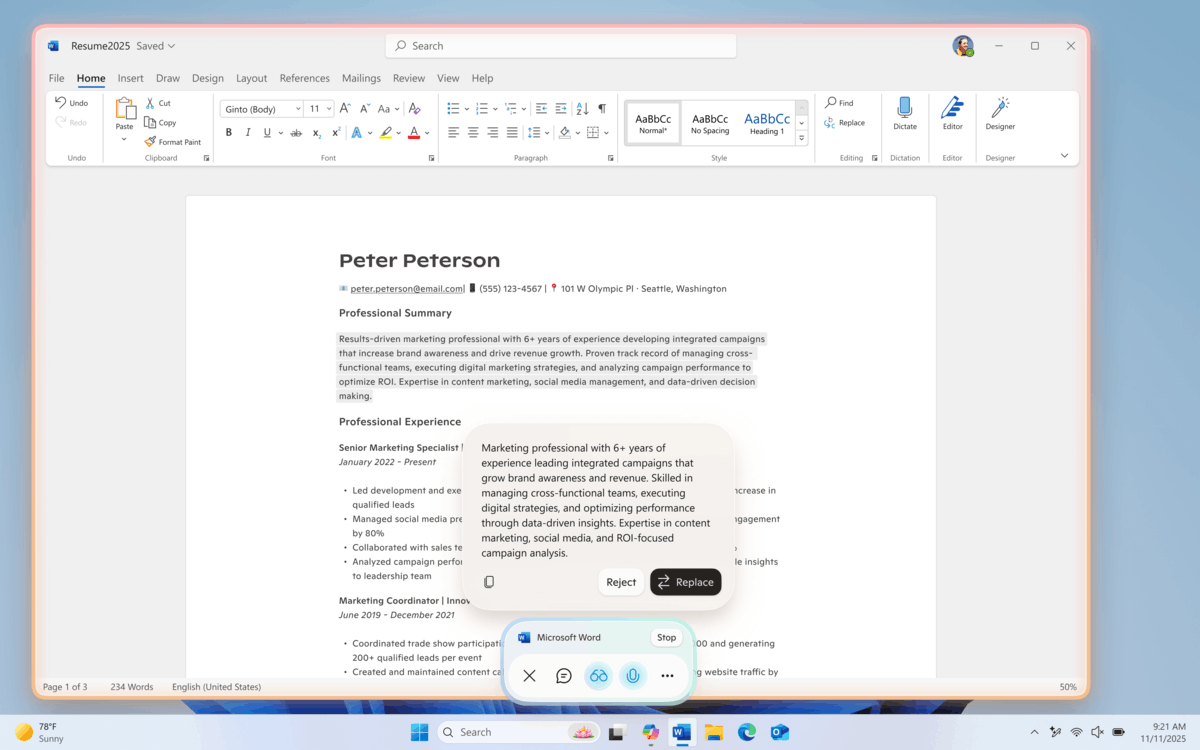
This new feature is integrated into Copilot Vision mode. Users can now rewrite, refine, or edit text using voice commands.
How it works
Note: To use actions in Copilot, you need to enable the "Copilot Actions" feature in the Copilot app settings. Enabling this setting also unlocks experimental features for performing long-running tasks within Copilot Labs.
- Open the Copilot app and tap the glasses icon on the right side of the chat text field.
- Select the window containing the document or application you're working in. Copilot will analyze the screen contents.
- Place your cursor in any text field and speak a command in natural language. For example, "Rewrite this to make it more formal," "Make this text clearer," or "Simplify this text."
- Copilot will suggest an edit. A preview is available before applying the changes, allowing you to accept or adjust the AI's suggestion.
The update is available in the Microsoft Store to all Windows Insiders, regardless of the update channel they use. The new feature is being rolled out in several stages. It is currently not available to users in the European Economic Area (EEA).
Support us
Winaero greatly relies on your support. You can help the site keep bringing you interesting and useful content and software by using these options:

