Microsoft has released Windows 11 build 26220.7653 (KB5074157), to Insiders in the Beta channel. Microsoft has updated the dialog boxes in Settings under Accounts > Other users, adopting the modern WinUI framework and adding dark theme support. Users can now set .webp images as desktop backgrounds through Personalization settings. Copilot suggestions in Click to Do now load instantly, though this update excludes Windows Insiders in the European Economic Area and China. And more.
Advertisеment
What's new in Build 26220.7653 (Beta)
For Insiders with the "Get the latest updates as soon as they're available" toggle enabled:
Changes and improvements
Account settings
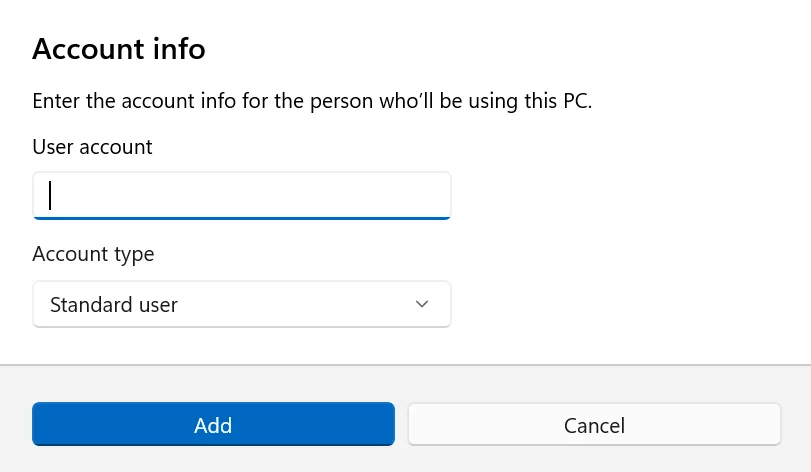
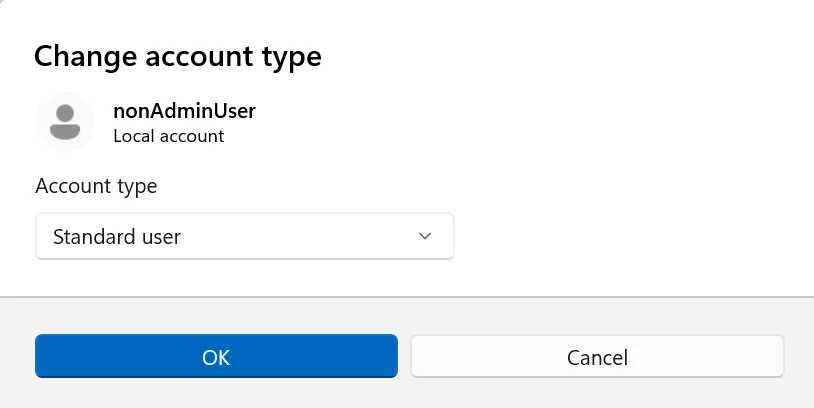
The design of dialog boxes in Settings > Accounts > Other users has been updated. The new interface is based on the modern WinUI framework and supports dark theme.
Create new account dialog
Change account type dialog
Click to Do
- Copilot suggestions in Click to Do now load instantly. This change does not currently apply to Windows Insiders in the European Economic Area (EEA) and China.
Desktop background
- Users can now set.webp images as desktop backgrounds via Settings > Personalization > Background.
Fixes
Taskbar and system tray
- Fixed an issue where the Taskbar, when set to auto-hide, could appear before interacting with the bottom of the screen, blocking the use of apps in that area.
- Fixed an issue where the Start menu, Notification Center, and quick actions menu would sometimes not open when clicked, although hotkeys for these items would still work.
Start Menu
- Fixed a memory leak when opening the Start menu that could cause performance issues over time.
- Fixed an issue for Arabic and Hebrew users where the Start menu would open on the wrong side of the screen if taskbar icons were not centered.
- Fixed an issue where opening a folder with pinned apps and attempting to scroll using touch would close the Start menu.
Bluetooth
- Fixed an issue where some Insiders were not seeing the battery level of Bluetooth devices even if the device supported the feature.
"Xbox Full Screen Experience" for PC
- We've fixed unexpected behavior in some applications and games when using FSE mode. Microsoft continues to test various scenarios, so the issue remains a known issue.
Login and Lock Screen
- Fixed an issue where the password icon on the login screen could appear blank.
Settings
- Fixed an issue resulting in Settings crashing when interacting with audio devices in the last two flights.
- Fixed an issue where the keyboard character repeat delay setting in Settings > Bluetooth & Devices > Keyboard was working in reverse from how it was set in the system.
Other
- Fixed several issues with text clipping in msinfo32 when using high display scaling.
- Fixed an issue for some Insiders where clicking.appinstaller files to install MSIX packages would unexpectedly result in an "invalid argument" error.
- Fixed an underlying issue where underlining of text with certain fonts would not appear in Notepad when the display zoom was set to 125%.
- Fixed an issue that could cause the explorer.exe process to hang upon first login if certain applications were configured as startup applications. This could result in the taskbar not appearing.
Known issues
"Xbox Full Screen Experience" for PC
- Some applications may behave incorrectly when using FSE, especially if they have a fixed window size or launch additional windows.
Taskbar and system tray
- Investigating an issue where some Insiders aren't seeing apps in the system tray area when they should be.
Display and graphics
- [New] Working on a fix for an issue where a small number of Insiders are experiencing second monitors not working correctly (black screen) in recent builds.
Click to Do
- Investigating an issue where the Microsoft 365 Copilot input field for selected images doesn't work if Microsoft 365 Copilot isn't running.
Support us
Winaero greatly relies on your support. You can help the site keep bringing you interesting and useful content and software by using these options:

