Microsoft has released Windows 11 Build 26220.7344 (KB5070316) to Insiders in the Dev and Beta channels.
Advertisеment
For Insiders with the "Get the latest updates as soon as they're available" toggle enabled
Preview of MCP support on Windows
Windows now offers native support for the Model Context Protocol (MCP), an open standard that provides a universal way for AI agents to interact with apps, tools, and services.
AI agents can discover these tools (as well as other agents) and connect to them through a secure, managed registry on the Windows device (on-device registry, or ODR). By default, all agent connectors in this registry will operate in an isolated, secure environment with their own identifier and audit trail.
Thanks to integration at the operating system level, MCP on Windows provides:
- Safe detection of components.
- Unified controls.
- Enterprise-grade manageability.
This enables developers, IT professionals, and end users to build and deploy AI-powered workflows at scale.
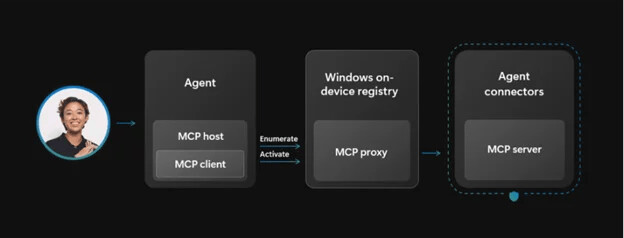
This build includes two agent connectors built into Windows: one for File Explorer and one for the Settings app.
File Explorer connector
With user consent, agents can use this connector to manage, organize, and search local files on the device. On Copilot+ PCs, the connector also supports natural language search, allowing users to find files by description, content, metadata, and, for images, advanced classification-based search.
Settings Connector
On Copilot+ PC devices, this connector allows users to check and change settings using natural language, as well as directly navigate to relevant pages such as Display, Mouse, Keyboard, and Sound.
Quick Machine Restore
The Quick Machine Recovery (QMR) feature will now be automatically enabled for devices running Windows Professional that are not joined to a domain. These devices will receive the same recovery options as Windows Home users.
For domain-joined corporate computers, nothing will change - QMR will remain disabled until your organization enables the feature.
Update Orchestration Platform (UOP)
The Unified Update Orchestration Platform (UOP) is becoming available to Windows 11 Insiders in the Dev and Beta channels. UOP makes app updates more consistent and predictable. Users will see a new page under Settings > Apps > App Updates, where they can track update progress and take appropriate action.
How does this work
Applications register with UOP via the API.
UOP initiates the checking, downloading, and installation of updates by the registered application based on user activity and system state.
Applications continue to use their own backend services to receive updates.
Apps report update status back to UOP so users can see it on the App Updates page.
Availability
Currently, no applications use UOP, as it's a new feature, but developers will begin implementing it in their products over time. The feature is currently enabled for a small number of Insiders in the Dev and Beta channels. API documentation will be provided later.
Windows MIDI Services
Microsoft announced the release of Windows MIDI Services. This feature is available to Windows 11 Insiders in the Dev and Beta channels starting today, and will be rolling out to the stable OS in the coming months. This update to MIDI support in Windows aims to provide the best possible experience for musicians using MIDI 1.0 or MIDI 2.0.
New features
- Full support for WinMM MIDI 1.0 and WinRT MIDI 1.0, including internal translation. This allows any API to use any MIDI 1.0 or MIDI 2.0 device. Existing applications will use the new service and gain important capabilities, such as simultaneous MIDI port opening by multiple applications, custom port names, and much more.
- New support for loopback and MIDI interaction between applications.
- Numerous performance improvements and bug fixes.
- The App SDK and tools are available for separate download. It enables apps to utilize native MIDI 2.0 features and provides tools for managing your MIDI configuration in Windows, including the MIDI Console and MIDI Settings app.
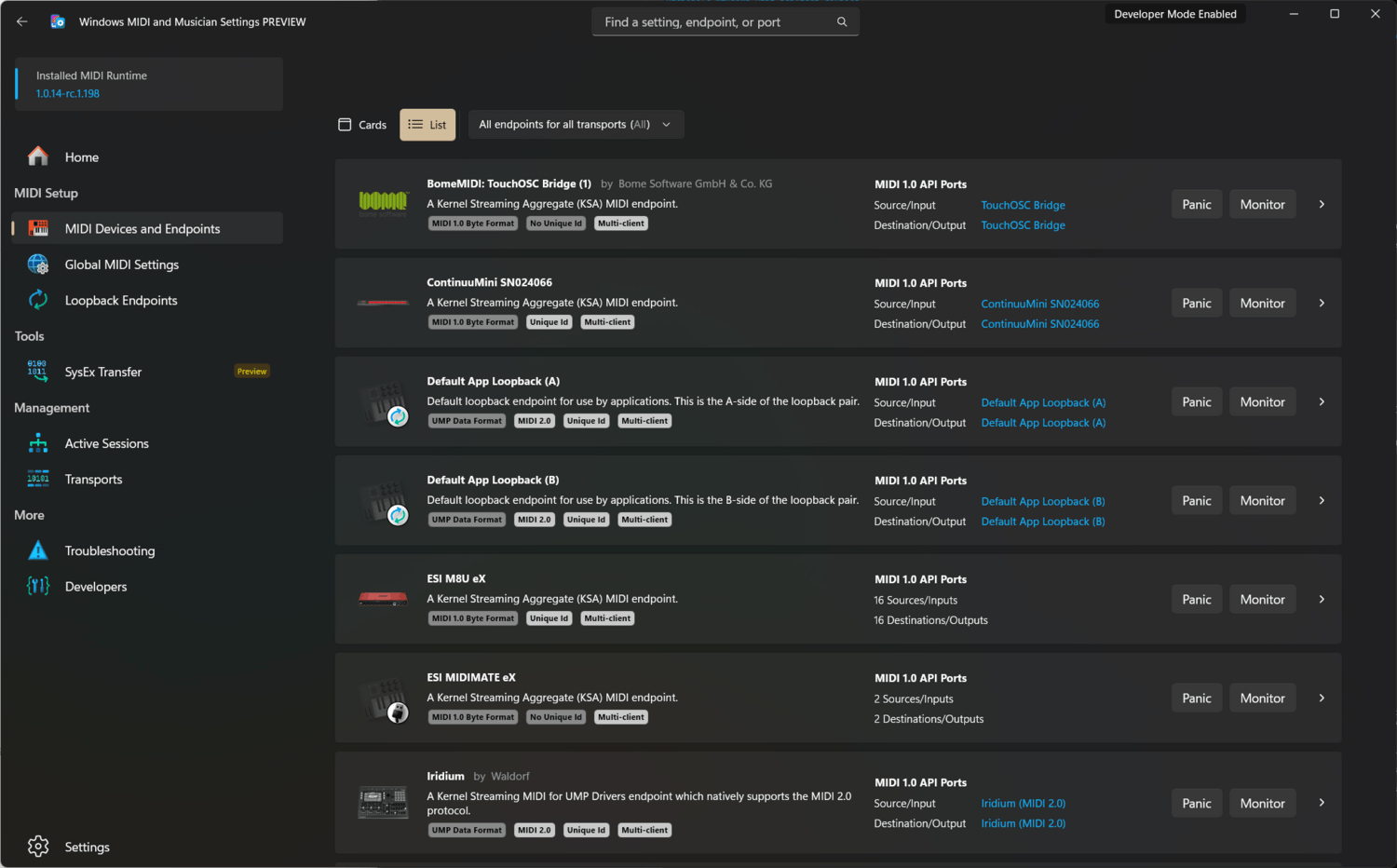
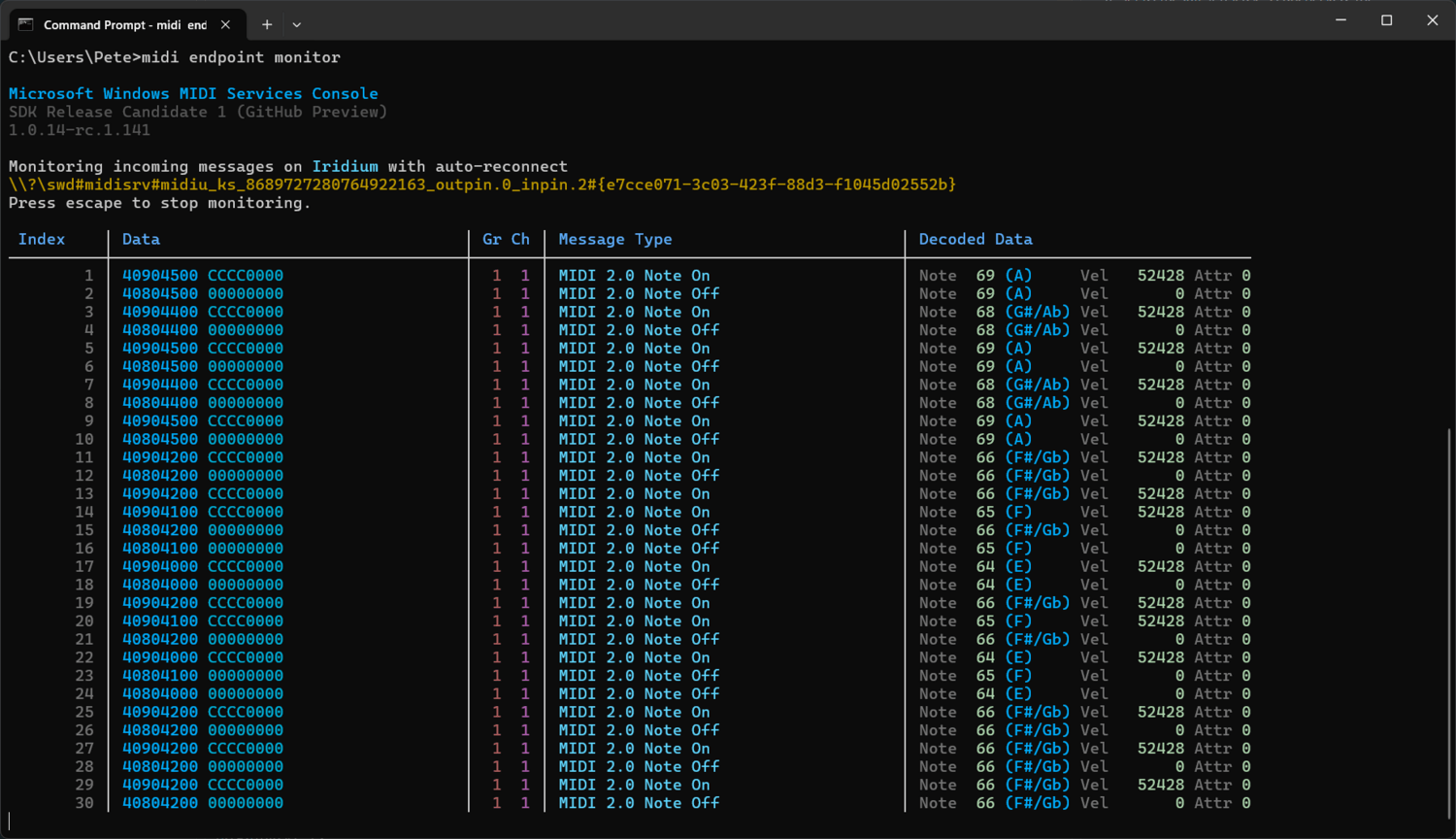
Releases are available on GitHub or on the Windows MIDI Services homepage. Please note that these files are currently unsigned, so you may see a warning when downloading and installing.
Changes and improvements
App recommendations in the Open with window
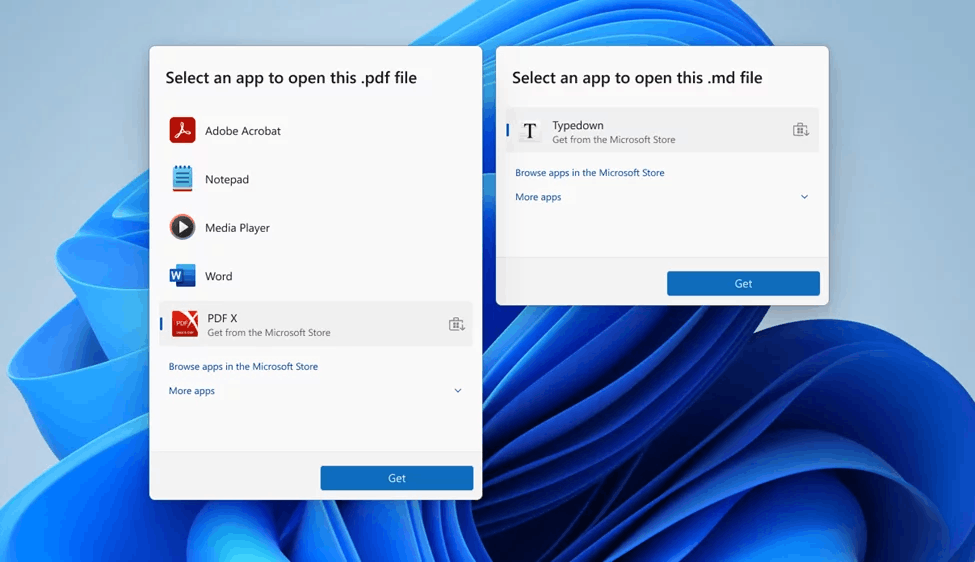
Previously, when attempting to open a file without an associated app, an "Open with" dialog box would appear, prompting you to search the Microsoft Store for suitable apps.
Now, suitable apps from the Microsoft Store will appear directly in this dialog box. You no longer have to navigate to the store to find the app you need, making finding and installing the app you need faster and easier.
Fixes
Search
- Fixed a recent issue where the search box could unexpectedly appear on top of the taskbar.
File Explorer
- The "AI Actions" section will no longer appear in the context menu if there are no actions available or enabled.
- Fixed an issue resulting in File Explorer failing to search some SMB shares after installing recent builds.
Windows Hello
- Fixed an issue that caused fingerprint recognition to fail for some Insiders after installing previous builds.
Display and graphics
- Fixed an issue where the Cast to Screen panel might not appear after pressing the Win + P keyboard shortcut.
Xbox Full-Screen Experience for PC
- For Insiders using the new Xbox Full-Screen Experience on PC, the virtual keyboard should now appear correctly when using a gamepad on non-touch devices.
Other
- Fixed an issue that occurred in the previous build that caused a GSOD with the error DRIVER_IRQL_NOT_LESS_OR_EQUAL when using a gamepad.
- Fixed an issue that could cause the PC to freeze when attempting to launch Windows Terminal with elevated privileges from an account that does not have administrator privileges.
Known issues
Xbox Full-Screen Experience for PC
- Some applications may behave incorrectly when using FSE, especially if they have a fixed window size or launch additional windows.
Taskbar and system tray
- Investigating an issue where the Start menu doesn't open when clicking the Start button for some Insiders, but does open when pressing the Windows key. This issue is also believed to affect the Notification Center (which can be opened with WIN + N).
- Investigating an issue where some Insiders aren't seeing apps in the system tray area when they should be.
File Explorer
- In the dark theme, when scaling text in the copy dialog, the scroll bar and footer are missing and a white box is displayed instead.
- Investigating an issue where File Explorer may display a white flash when navigating between pages after installing the previous build.
- [New] Working on a fix for an issue where opening the context menu could cause explorer.exe to crash.
Bluetooth
- Investigating an issue where the battery level of Bluetooth devices isn't showing up for some Insiders.
ℹ️ Insiders in the Beta channel will now receive builds based on version 25H2, just like Insiders in the Dev channel. This update is currently recommended.
If you're using the Dev channel, you now have the option to upgrade to the Beta channel. This option will be available as long as the Dev and Beta channels receive the same builds. At the end of February, higher build numbers will appear on the Dev channel, and upgrading to the Beta channel will no longer be possible.
Future builds on the Dev channel may not be as stable as they are now. Microsoft strongly recommends considering which update channel you want to stay on.
Support us
Winaero greatly relies on your support. You can help the site keep bringing you interesting and useful content and software by using these options:

