Google has launched Chrome 143, accompanied by a stable release of Chromium, the open-source foundation of the Chrome browser. An Extended Stable branch remains available for users requiring additional time for updates, supported on an eight-week cycle. The next scheduled release, Chrome 144, is set for January 13, 2026.
Advertisеment
What's new in Chrome 143
Deprecation of XSLT Support
Chrome 143 marks the deprecation of Extensible Stylesheet Language Transformations (XSLT), including the XSLTProcessor API and XML stylesheet parsing instructions. Google mentions security concerns raising from the libxslt library, which suffers from predictable maintenance and may serve as an attack vector in browser exploits. Usage statistics indicate XSLT appears on only 0.02% of web pages. Full removal of XSLT support is scheduled for Chrome 155.
Expanded AI Capabilities
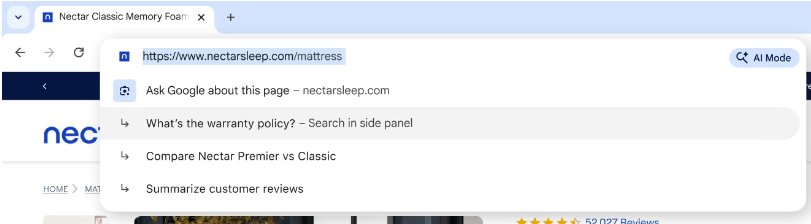
Chrome 143 introduces enhanced functionality for its AI mode, accessible via the address bar or the new-tab page. This feature enables users to issue complex natural-language queries and receive synthesized responses drawn from the most relevant web content. Users may refine results through follow-up questions. The AI mode also supports page-specific inquiries directly from the address bar. On macOS and Windows, activation requires pressing the Tab key before typing in the address bar.
CSS and Layout Improvements
Container Queries and Background Positioning
The release integrates the new CSS selector @container anchored(fallback), which adjusts styling for positioned elements when the browser applies an alternative placement via the position-try-fallbacks property to avoid overflow. Additionally, the background-position-x and background-position-y properties now support edge-relative positioning, such as background-position-x: left 30px;.
Typography and Localization
Developers gain access to the font-language-override CSS property, which permits overriding the default language used for glyph substitution in OpenType fonts. This enables rendering of language-specific glyph variants, for example through font-language-override: "RUS";. The browser also upgrades the International Components for Unicode (ICU) library to version 77.1, adding support for Unicode 16 and refreshed locale data.
API Additions and Enhancements
Chrome 143 expands web platform capabilities with several new APIs and updates:
- The
WindowEventHandlersinterface now supportsongamepadconnectedandongamepaddisconnectedevents for gamepad detection. - JavaScript DOM APIs now accept all characters permitted by the HTML parser in element and attribute names and prefixes.
- WebTransport now allows client-specified protocol negotiation during connection setup.
- The experimental Web Install API, available under Origin Trial, introduces
navigator.install()to enable websites to prompt users to install web applications, subject to explicit user consent.
Developer Tools Update
Chrome DevTools receives several enhancements in this release:
- Integration with the experimental Model Context Protocol (MCP) server now permits external AI assistants to access DevTools capabilities.
- The Elements panel adds support for debugging
@starting-styleCSS rules. - The Lighthouse auditing panel updates to version 13.
- Performance trace exports now optionally include HTML, CSS, JavaScript source files and source map data in the archive.
Security Fixes and Bug Bounty Program
Chrome 143 addresses 13 security vulnerabilities, none of which are classified as critical remote code execution flaws outside the sandbox. Most issues were identified through automated testing using AddressSanitizer, MemorySanitizer, Control Flow Integrity, LibFuzzer, and AFL.
Google awarded 13 bug bounty payouts of $18,000 for this release, including one $11,000 award, two $3,000 awards, and one $1,000 award. The amounts for nine additional rewards remain undisclosed.
The official announcement is here.
Support us
Winaero greatly relies on your support. You can help the site keep bringing you interesting and useful content and software by using these options:

