Mozilla has released Firefox 146 alongside updates for its Extended Support Release (ESR) branches: versions 140.6.0 and 115.31.0. The development team has also promoted the Firefox 147 branch to beta testing, with a stable release scheduled for January 14. Here are the key changes.
Advertisеment
What's new in Firefox 146
Split View Mode Introduced
Firefox 146 introduces a new "Split View" mode that enables side-by-side tab viewing within a single browser window. This feature remains disabled by default and requires manual activation via the browser.tabs.splitView.enabled flag in about:config. Check out this tutorial if you need more details.
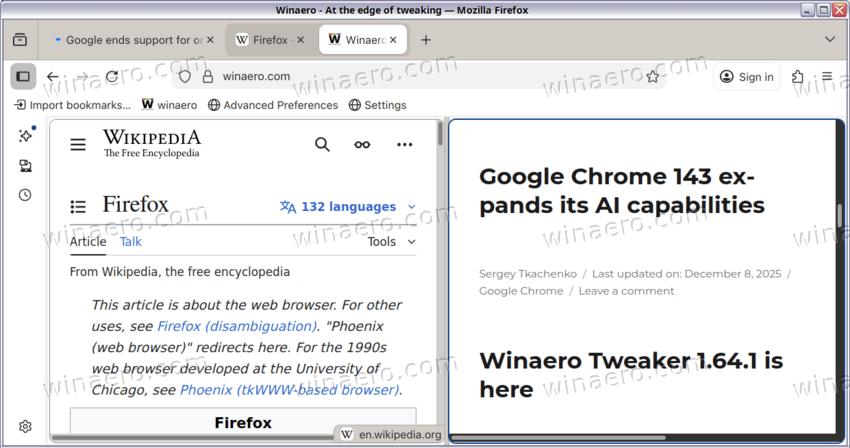
Once enabled, users can access the "Add Split View" option from the right-click context menu on tabs. Selecting this option for a single tab displays a new tab in the right panel, while applying it to a pair of tabs renders them adjacent to each other. Users may adjust the relative size of each panel by dragging the central divider. The currently active tab receives a red outline for visual distinction.
Weather Widget Expansion
The weather forecast widget on the new tab page now supports significantly more countries. Automatic or manual location selection determines the displayed forecast.
Among others, Estonia, Latvia, and Lithuania are officially supported. Users in other regions may enable the feature manually through the browser.newtabpage.activity-stream.discoverystream.region-weather-config preference.
Improved Color Customization Interface
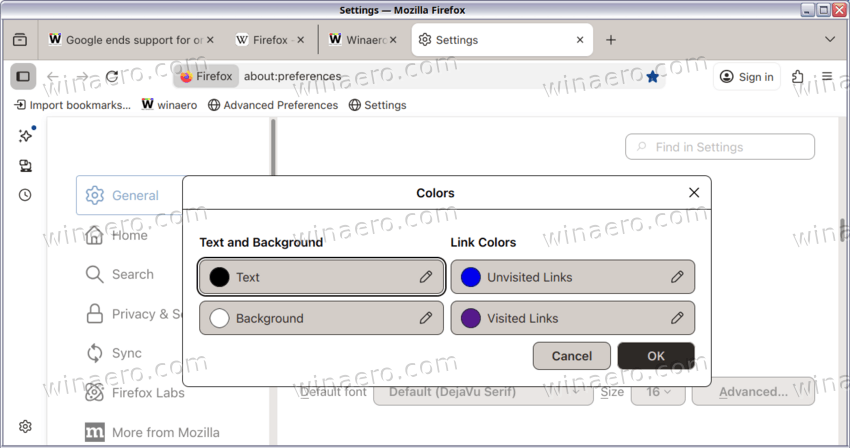
The browser’s color override dialog, accessible via Contrast Control or Manage Colors, has been redesigned. Interface elements now group adjustable colors with clear, descriptive labels to enhance usability.
Search and Recommendations
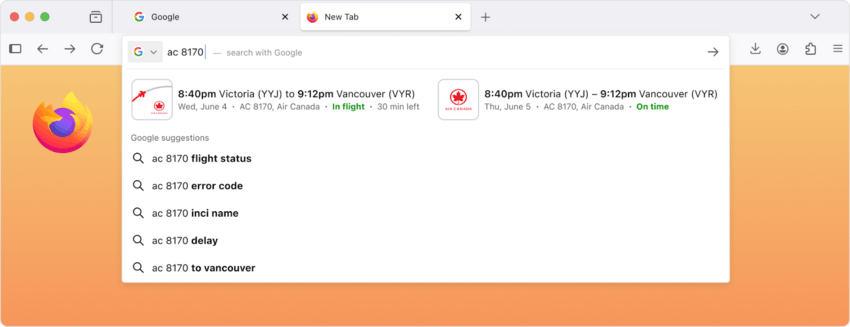
Search queries entered in the address bar may now trigger inline display of results within the dropdown recommendations panel. This functionality is being rolled out gradually and remains disabled for some users at launch.
Platform-Specific Updates
Linux Graphics Improvements
Firefox 146 adds support for fractional scaling on Linux systems running the Wayland display protocol, improving rendering clarity on high-density displays. Additionally, the embedded Skia 2D graphics library has been updated, resulting in better GPU-accelerated rendering performance and broader compatibility.
Windows and macOS Changes
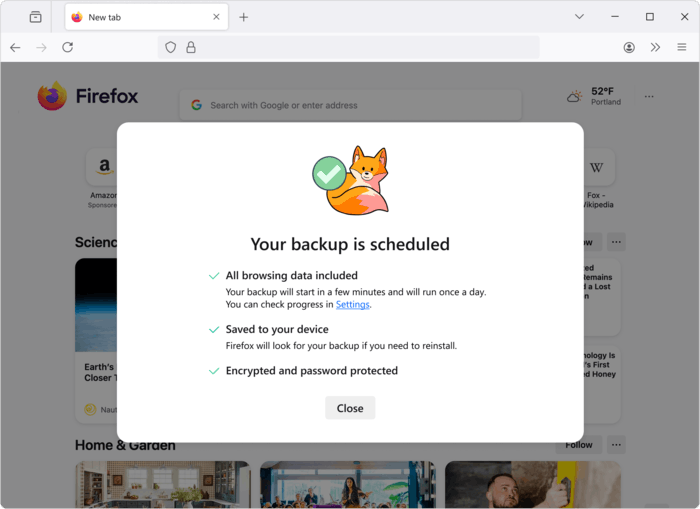
On Windows, Firefox discontinues support for the Direct2D API. A new automated backup system for passwords, bookmarks, internal databases, and other profile data is also introduced, though it remains exclusive to Windows for now. Backups occur daily and support optional password encryption, facilitating profile restoration on new installations.
macOS builds now launch a dedicated GPU process by default to handle WebGPU, WebGL, and WebRender operations. In the event of a GPU-related crash, only the GPU process restarts, preventing full browser termination.
Android Improvements
The file upload interface on Android has been simplified. When websites do not specify accepted file types, Firefox offers users three clear options: select a file, capture a photo, or record audio.
Developer and Web Platform Features
CSS Enhancements
Firefox 146 implements the @scope CSS rule, which confines style declarations to a specified DOM subtree without requiring highly specific selectors. The browser also adds support for the contrast-color() function, which returns a contrasting color (e.g., black for white inputs), and the text-decoration-inset property, which fine-tunes the positioning of text decoration lines.
Legacy support for the -webkit-fill-available keyword in width and height properties has been added as a temporary alternative to the emerging stretch keyword.
Developer Tools Optimization
The Rules panel in Firefox Developer Tools now hides unused CSS properties by default, reducing visual clutter and improving panel rendering performance.
Security and Cryptography Upgrades
Quantum-Resistant Encryption in WebRTC
WebRTC now supports traffic encryption using the ML-KEM post-quantum cryptographic algorithm. Key exchange occurs during DTLS 1.3 connection negotiation, enhancing resistance against future quantum computing attacks.
Efficient Key Handling in WebCrypto
The WebCrypto API now includes support for compressed elliptic curve point representation. This reduces public key size by nearly 50%, lowering bandwidth and storage requirements while retaining full mathematical recoverability.
Security Fixes
Firefox 146 addresses 17 security vulnerabilities. Twelve of these relate to memory handling issues. Those include buffer overflows and use-after-free memory that could allow arbitrary code execution when loading maliciously crafted web content.
Experimental Features Now Widely Accessible
Firefox Labs, the section for testing experimental browser capabilities, is now available to all users regardless of telemetry or experiment participation status.
Download Firefox 146
- On Windows, if you have Firefox installed, then open the browser menu and select “About Firefox.” This will install the latest Firefox version.
- Alternatively, you may download the installer directly from the official release directory: https://releases.mozilla.org/pub/firefox/releases/146.0/. This page provides platform-specific builds organized into subdirectories by operating system, architecture, and interface language. Full offline installer packages are available for all supported configurations.
- Linux users are advised to install or update Firefox through their distribution’s package manager. For example, on Ubuntu or Linux Mint with the official
mozillateamPPA enabled, execute the following command in a terminal with appropriate privileges:
apt update && apt install firefoxThe official release notes for Firefox 146 are available at: https://www.mozilla.org/en-US/firefox/146.0/releasenotes/.
Support us
Winaero greatly relies on your support. You can help the site keep bringing you interesting and useful content and software by using these options:

